How to convert HD, AVCHD (MTS/MT2S) video files to iPhone 4
I recently treated myself to a HD camcorder as I will be going to South Africa soon for vacation
. I got the camcorder a bit early so I could have a chance to play around with it and practice editing the clips, the camcorder records the clips in .MTS format which is a High-definition MPEG Transport Stream video format, commonly called "AVCHD" used by Sony, Panasonic, and other HD camcorders. Generally, the file extension of AVCHD video is .MTS on camcorder and .M2TS after import to computer. I guess that if someone who have m2ts or other AVCHD videos, he or she would be frustrated that there are few devices which support m2ts video. Normally, you can only play your m2ts video directly from a camcorder on an HDTV with a HDMI, or play them on a Blu-ray Disc player. Why these videos do not play on my PC, laptop, iPod, iPhone or any other portable mp4 players? OK, Here below I will give you an example of how to convert HD, AVCHD (MTS/MT2S) videos to popular devices with iPhone 4.Things you'll need
1. HD, AVCHD (MTS/MT2S) video files
2. Aneesoft iPhone 4 video converter
3. Your windows PC and your iPhone 4
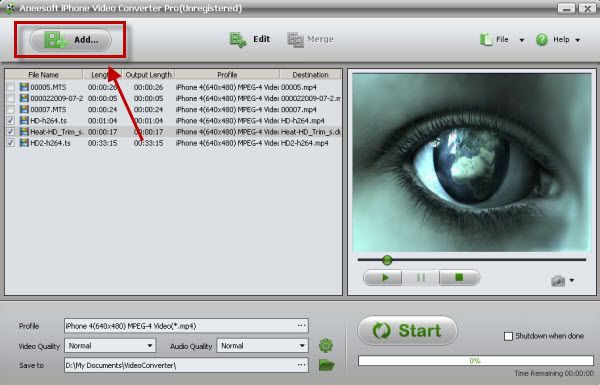
Step 1: Download & install Aneesoft iPhone 4 video converter and add HD videos Download and run Aneesoft iphone 4 video converter, and click Addbutton to select the HD video files need converted. Aneesoft iPhone 4 video converter provides a complete solution to convert iPhone 4 video from all popular video formats for your iPhone 4.
Share: Note: if you run MAC system, please download the MAC version here. And if you want to convert HD videos to other devices, please download Aneesoft video converter Pro.
Step 2: Output Setting
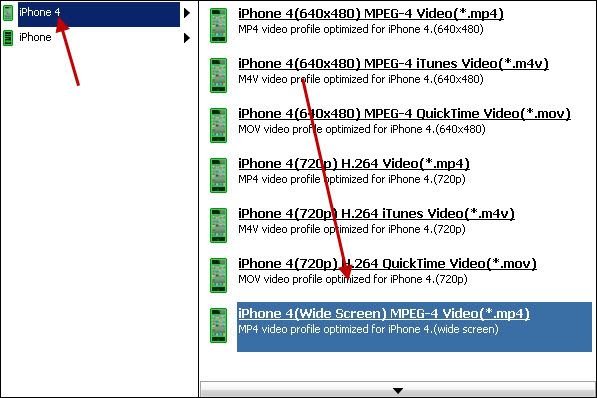
After you finish video source setup, you can now select iPhone 4 MPEG-4 video in the drop-down box and specify a directory on your computer to save the output files. Different file formats result in different video compression rates. Bit rate refers to the number of bits processed per unit of time, the larger the number, the more bits processed and the better the quality. Resolution refers to the number of pixels handled by the device display.
Share:Step 3: Edit your videos: trim, crop, effect, watermark and deinterlace
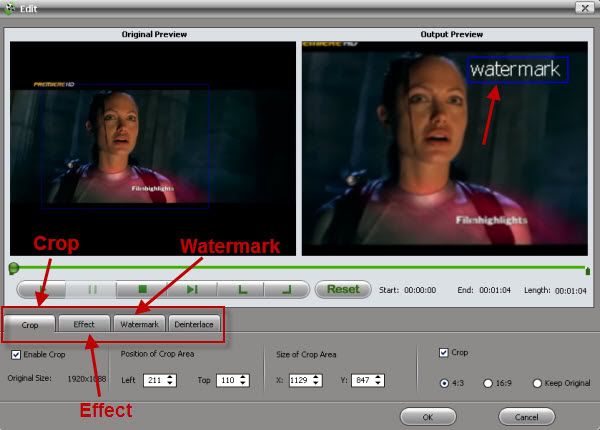
This Aneesoft iPhone 4 video converter allows you to trim, crop your videos, which may help you removing the black edges around your video, so that you can watch your movies in full screen. You can also set different video effect such as grey, invert, gamma, sepia and so on, in addition, if you want to add watermark on your video, you can click "Watermark" tab and then check "Enable Effect" option box. You may add Text or Image watermark onto your video.
Share:Step 4: Conversion
To start converting, click the Start button. The Progress bar shows the status of the converting task. Aneesoft iPhone video converter prompts you when the converting task is completed, then click OK.
In addition, I tell you more about HD formats What is MTS and what is M2TS?
MTS and M2TS are included by AVCHD video. AVCHD (Audio and Video Compression for High Definition) is a high-definition and standard-definition recording format for use in digital tapeless camcorders.
About AVCHD video
AVCHD (AVC-HD, AVC HD) video is recorded using the MPEG-4 AVC/H.264 video compression codec. Audio is stored in either compressed form (Dolby AC-3), or uncompressed form (multichannel PCM). Aside from recorded audio and video, AVCHD includes features to improve media presentation: menu navigation, slide shows and subtitles. The menu navigation system is similar to DVD-video, allowing access to individual videos from a common intro screen. Slide shows are prepared from a sequence of AVC still frames, and can be accompanied by a background audio track. Subtitles are used in some camcorders to timestamp the recordings.
How to convert HD, AVCHD (MTS/MT2S) video files to iPhone 4
By: xiaoa