Why Not Use Skype In The Conference Room?
There is no doubt that Skype has done much for video conferencing
. Its transition from an audio only service to audio with video has enabled millions of people worldwide to accept this form of video conferencing into their daily lives. Keeping up with friends and family overseas has never been easier and with a price tag of free it is a very compelling technology. Many other companies have jumped on the success of Skype notably Apple with Facetime and Google with Google+ as well as a multitude of other chat and video applications.Outside of the consumer world enterprises have spent and continue to invest millions of dollars each year on enhancing corporate video conferencing from dedicated video conference rooms, Telepresence suites to desktop and the emerging mobile video conferencing. One of the questions we often get asked is why not just use Skype?
Skype works with Skype. You cannot make a Skype call to a video conference room. Skype uses its own proprietary method of communication there have been some attempts to create video gateways from video conference rooms to Skype clients but all have had limited success maybe things will change on this front with the Microsoft acquisition of Skype although they may well tighten up further and only allow Skype to work with their own Lync offering.
So, why not replace your room system with a Skype embedded smart TV or a desktop PC?
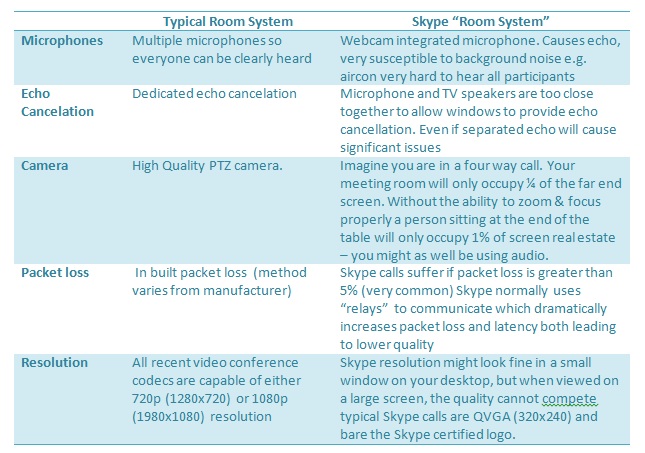
Room based video conference systems come at a price. They come at a price for very good reasons. They use high quality components to provide you with the best possible video conference experience. The table below shows the main differences in Skype in a meeting room vs dedicated hardware.
Share:
You can see that there are clearly significant differences between Skype in a meeting room and a traditional video conference room. These factors added together really highlights why I would never consider using Skype in a meeting room environment.
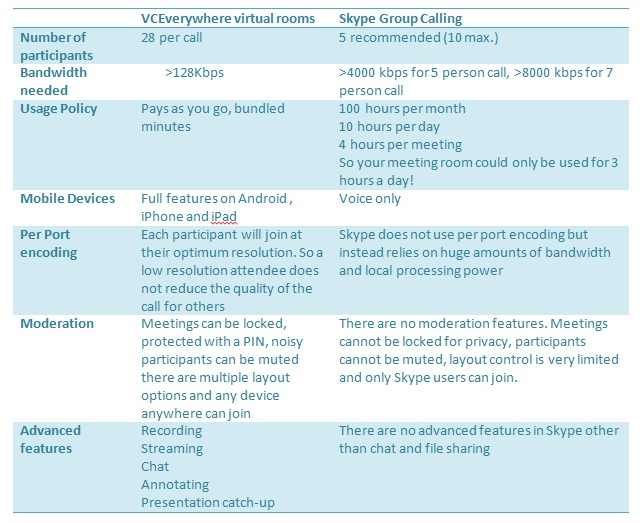
A recent feature to Skype has been the ability to have more than just two people on a video call. Skypes group video calling looks compelling, allowing up to 10 people to join in a single video call at 6.99 Euros a month. Lets delve a little deeper into the small print and again and compare Skype Group calling with VCEverywheres virtual rooms.
Share:
Each participant will join at their optimum resolution.
So a low resolution attendee does not reduce the quality of the call for othersSkype does not use per port encoding but instead relies
on huge amounts of bandwidth and local processing powerModerationMeetings can be locked, protected with a PIN, noisy
participants can be muted there are multiple layout options and any device anywhere can joinThere are no moderation features. Meetings cannot be locked for privacy, participants cannot be muted, layout control is very limited and only Skype users can join.Advanced featuresRecording
Streaming
Chat
Annotating
Presentation catchupThere are no advanced features in Skype other than chat and file sharing
Again, once you look into the small print and look into the real world corporate environment the case for Skype once again reduces. I cant really imagine having a Skype video conference room that can only be used for 3 hours a day. These limitations though really have little bearing in the consumer world where you just want to chat or catch up.
Security also becomes a concern with Skype. Not the actual stream, which contrary to popular belief does have 256bit AES encryption but security around the corporate network. File sharing is a built in component of Skype which many organisations absolutely do not want to allow. The instant messaging functions built into Skype, whilst at the core of the consumer benefits this contravene many enterprise security edits particularly as it constitutes written communication which may legally have to be recorded and archived.
The Skype client itself also provides advertising at the bottom. Today Skype use this for their own advertising but with no control over the client what is to stop inappropriate advertising from Skype ? Finally there are Skype Supernodes. The Skype network relies on a huge number of PCs with the regular Skype client installed to act as Supernodes. These super nodes act as directory services for other calls to be made. In the consumer world this probably doesnt really matter too much as it is part of your give for using a free service. In the enterprise though this effect would absolutely be undesirable and additional measures have to be taken to prevent this (via GPO for example)
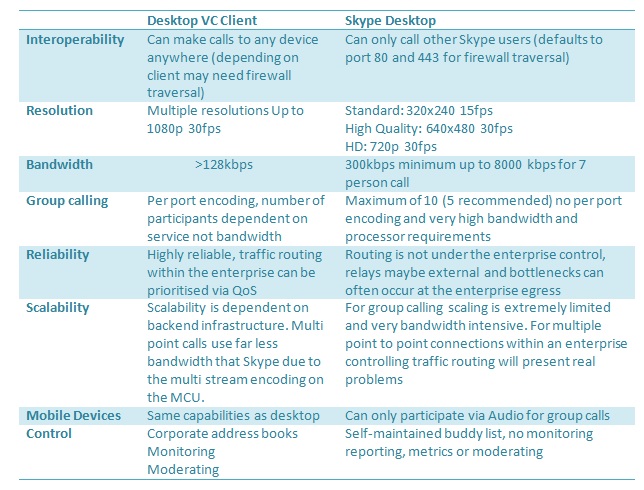
Looking at desktop to desktop video calling. This is probably the closest slimily to using Skype in the consumer world. Again though, there are important differences between a standards based desktop video conference client and utilising Skype on the desktop.
Share:
The final area to look at is service and management. When things go well, they are great but when something goes wrong what happens?
With Skype you have no control over the network infrastructure that is running the service, there is no telephone helpdesk you can call and support is really limited to trawling the forums. With enterprise video conferencing the organisation is in control of all aspects and if managed by an external vendor they will provide live helpdesk support and assistance. Within an enterprise environment it is important to be able to measure and monitor the quality of services provided as well as understanding the impact one service has on another. With Skype, you have none of these controls. For example, if someone complains that email is going slow how would the helpdesk know that this is actually being caused by 2 people conducting 5 way Skype calls and as a result limiting the bandwidth available to other users? Or take the case in December 2010 when almost the entire Skype network was impacted for nearly 24 hours. How do I know who my top video users are and how do I know when they have problems? There is no service management with Skype, you are utilising a product not a service so you simply do not get a metrics and support that you get with a service.
To summarise, like all things in life you get what you pay for. Yes, I love Skype and use it daily to keep in touch with friends and family but today but for the foreseeable future I could not possibly advocate the widespread adoption of Skype within the enterprise.
Video Calls limited to other Skype users
Many technical issues limiting the use of Skype within meeting rooms
Poor resolution
Huge bandwidth requirements for multipoint calls
No moderation features in group calls
No live helpdesk support
No monitoring, service management or metrics
No video when group calling with mobile devices
Many enterprise security and compliance concerns
Requires admin rights to install
The P2P architecture used does not scale well with corporate networks.
Skype only works with other Skype clients
by: Mark SJ